
Key Takeaways
- Call tracking assigns unique numbers to sources, forwards calls to your real line, and logs attribution so phone leads are no longer a black box.
- Static numbers suit simple channel splits; dynamic number insertion (DNI) supports finer campaign and session-level attribution.
- Pool size for DNI should match peak concurrent sessions, not total daily call volume.
- Feed qualified call outcomes into the CRM and back to ad platforms so optimization includes phone results, not only clicks and forms.
- Keep the canonical number in HTML and schema; let tracking swap only the displayed number for visitors.
Most teams can tell you which ad got the click. Far fewer can tell you which campaign produced the phone call that actually became revenue. That gap is exactly why call tracking lead generation matters. Without it, phone-driven programs—especially pay-per-call and high-intent inbound—operate on incomplete data, and budget decisions rest on guesses instead of attribution.
Call tracking connects inbound phone calls back to the marketing sources that generated them. It assigns unique numbers, routes calls to your real line, and logs the source, campaign, and often the session details that led to the dial. For lead generation operators, that visibility turns phone volume from a black box into a measurable channel.
This guide explains how call tracking works in practice, the difference between static numbers and dynamic number insertion, how it supports lead quality and ROI decisions, and the operational habits that keep data clean. The goal is practical: so you can evaluate platforms, size number pools, and tie calls to the campaigns that deserve the credit. If you already run or buy pay-per-call volume, treating tracking as optional is one of the fastest ways to scale the wrong traffic.
What Call Tracking Means for Lead Generation
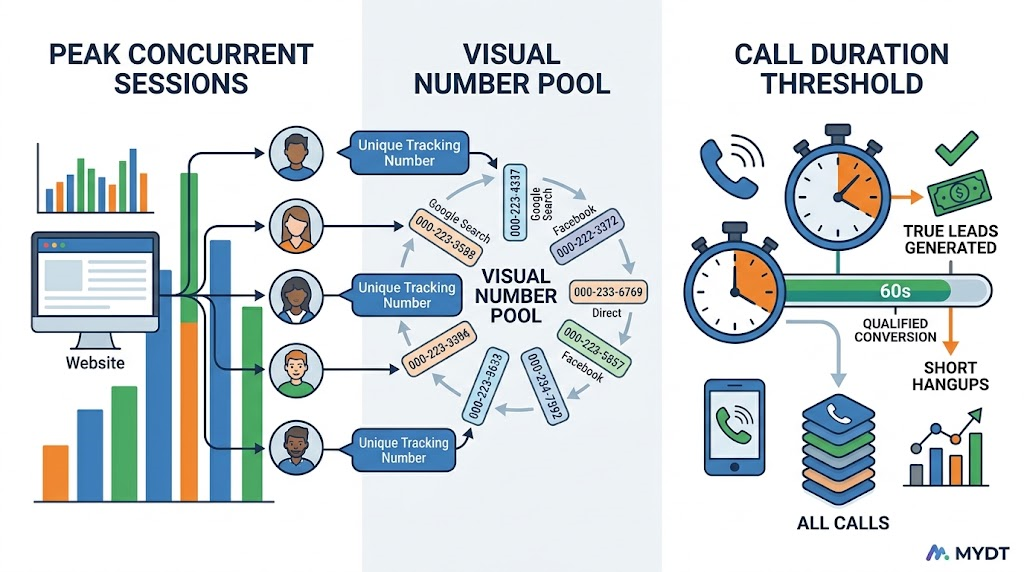
Call tracking is attribution technology for phone calls. A provider issues a pool of unique phone numbers. Those numbers are assigned to channels, campaigns, landing pages, or individual visitor sessions. When someone dials a tracking number, the call is forwarded to your business line in real time while the system records which source owned that number.
In lead generation, this closes a critical loop. Form fills leave a digital trail. Phone calls traditionally did not. If your highest-value opportunities arrive by phone—common in insurance, home services, and other high-intent verticals—you need a way to see which ads, keywords, and pages produced those conversations.
Without call tracking, marketing reports under-count phone-driven results. Teams then cut campaigns that look weak on clicks but strong on calls, or they over-invest in channels that generate form volume but little revenue. Tracking restores the missing half of the picture and makes cost-per-acquisition calculations honest.
This is especially important when you buy or generate pay-per-call leads. In that model, the call itself is the product. Knowing which upstream traffic and creative produced qualified, billable calls is the difference between scaling profitably and scaling noise. For a full primer on that channel, review our earlier guide on what pay-per-call leads are and how the model works in modern programs—the tracking layer described here is what makes those leads measurable end to end.
Call tracking also supports quality conversations with buyers and publishers. Duration, source, and recording data turn subjective disputes into reviewable facts. That transparency protects both sides when volume grows and margins tighten.
How Call Tracking Works Step by Step
The mechanics are straightforward once you separate number assignment from call routing and reporting. Understanding each stage helps you ask better questions of vendors and avoid implementation gaps.
Number Pools and Assignment
The tracking provider provisions a pool of local or toll-free numbers for your account. Each number becomes a distinct tracking endpoint. You assign numbers statically—one number per channel or campaign—or dynamically so that different visitors see different numbers based on how they arrived.
Static assignment works well for offline media, single landing pages, or simple channel splits (for example, one number for paid search and another for organic). It is cheaper and easier to manage, but it cannot tell you which keyword or ad within a channel produced the call.
Dynamic assignment, often called dynamic number insertion (DNI), uses a JavaScript snippet on your site to swap the displayed number in the visitor’s browser according to UTM parameters, referral source, or session data. The real number stays in the server-rendered HTML for crawlers and consistency; only the visible number changes for the human visitor.
Routing, Logging, and Attribution
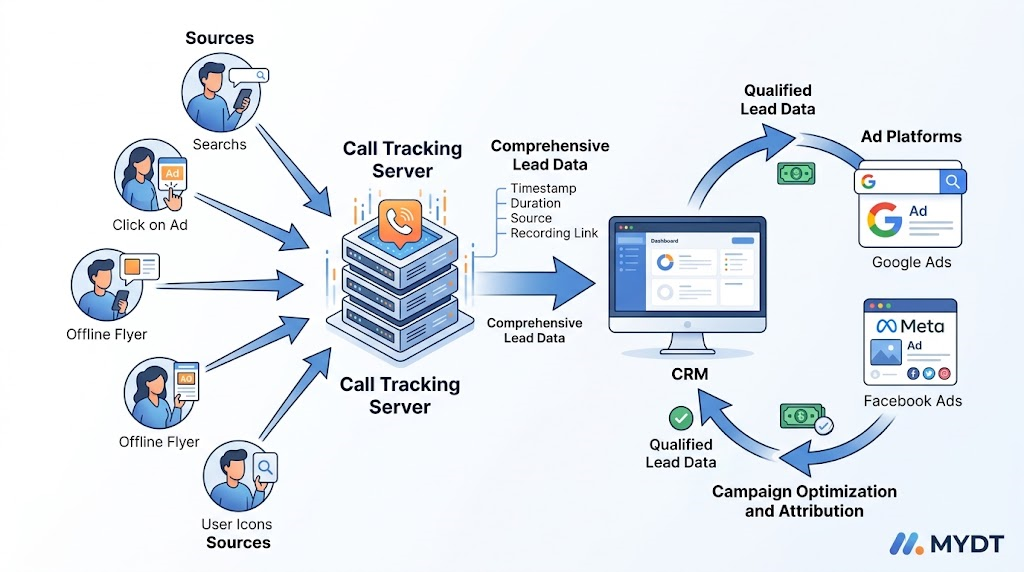
When a prospect dials a tracking number, the platform forwards the call to your real business line almost instantly. The caller experience does not change. Behind the scenes, the system logs the tracking number, timestamp, duration, caller ID when available, and the source data tied to that number—campaign, keyword, landing page, or session path.
Qualified calls can then be pushed into your CRM, marked with source fields, and in many setups sent back to ad platforms as offline conversions. That feedback loop lets bidding systems optimize toward calls that actually lasted long enough to matter, not just any dial. Minimum duration thresholds—often 60 or 90 seconds—filter out misdials and immediate hang-ups so reports stay useful.
Advanced setups also capture GCLID or equivalent click identifiers so a later call can still be matched to the original ad click even if the user did not convert on the first visit. Losing that ID is one of the most common reasons offline conversion imports fail.
Static Tracking vs Dynamic Number Insertion
Choosing the right tracking depth depends on traffic volume, campaign complexity, and how granular your reporting needs to be. Many programs start static and add DNI once the basics are proven.
| Aspect | Static Numbers | Dynamic (DNI) |
| Granularity | Channel or campaign | Source or session level |
| Number pool size | Small (few numbers) | Sized to peak concurrent sessions |
| Best fit | Offline, simple splits | Paid search, multi-campaign sites |
Session-level DNI needs a pool large enough for peak concurrent visitors, not total daily calls. Undersizing the pool causes number reuse and muddy attribution. Oversizing increases cost without proportional insight. A common sizing approach is peak concurrent sessions multiplied by a small safety factor.
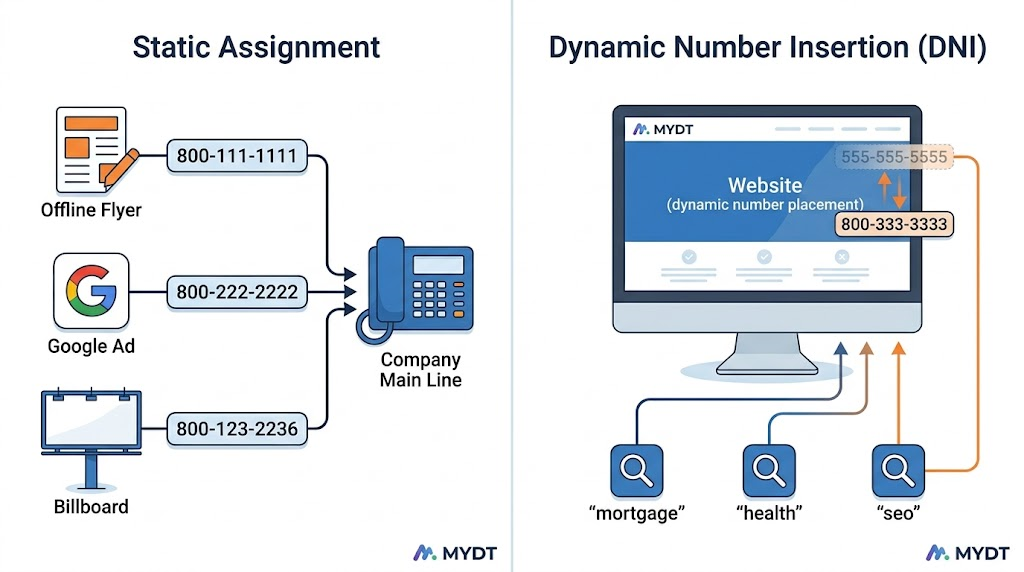
For local SEO, keep the real number in markup and structured data. Let DNI change only what the visitor sees. Replacing the canonical number sitewide with rotating trackers creates consistency problems that tracking was never meant to solve.
Why Call Tracking Matters for ROI and Lead Quality
Attribution is only useful if it changes decisions. In lead generation, call tracking supports three concrete outcomes that show up in weekly reviews.
First, budget allocation. When you see that one campaign drives longer, higher-intent calls while another drives short hang-ups, you can shift spend with evidence instead of intuition. Phone-heavy verticals often discover that “low CTR” campaigns were actually strong on qualified talk time.
Second, creative and landing page testing. If two pages produce similar click volume but very different call rates or call durations, the page that produces conversations deserves more traffic. Tracking makes that comparison possible without relying on form fills alone.
Third, buyer and seller accountability in pay-per-call and exclusive lead programs. Duration thresholds, source tags, and recordings make quality disputes more objective. Both sides can review the same data rather than argue from incomplete reports.
Broader marketing measurement frameworks still apply. For how teams connect multi-touch journeys and offline outcomes, established resources such as HubSpot’s overview of marketing attribution provide useful structural context. Pair those concepts with phone-specific tracking so calls are not left outside the model.
Lead operations also benefit when call data lands in the same system as form leads. Routing, scoring, and follow-up rules can treat a qualified inbound call with the same rigor as a qualified form submission. For how modern teams structure that handling, see Salesforce’s lead management capabilities as a reference for process design—then map your call events into the same stages so phone and form opportunities compete fairly for agent time.
Common Mistakes When Implementing Call Tracking
Even solid platforms produce weak data when implementation is incomplete. These patterns show up repeatedly in audits.
- Replacing the canonical business number in schema markup or Google Business Profile with a rotating tracking number—hurting local consistency and trust signals
- Undersizing the DNI pool so numbers recycle too quickly and attribution becomes unreliable
- Failing to pass GCLID or equivalent click IDs into the call record, so offline conversion import back to ads platforms fails
- Treating every answered call as a lead without duration filters or qualification tags
- Leaving call outcomes in a separate silo instead of writing source and status into the CRM
- Ignoring after-hours and overflow routing so tracked calls ring into voicemail without a clear disposition
A practical rule: keep the real number in server-rendered HTML and structured data; let DNI swap only the displayed number in the browser. Verify with JavaScript disabled and with URL inspection tools so crawlers still see the canonical NAP. Test the full path from ad click to CRM record before you scale spend.
A Practical Checklist Before You Scale Call Tracking
Use this list when launching or auditing a setup. Treat each item as a pass/fail gate rather than a nice-to-have.
- Real business number present in HTML source and LocalBusiness schema
- Tracking numbers assigned with clear static or DNI rules
- Number pool sized to peak concurrent sessions with a safety buffer
- Minimum call duration defined for “qualified” or billable events
- Source, campaign, and keyword fields written to CRM on call complete
- Offline conversion or call import path tested back to major ad platforms
- Recordings and retention policy aligned with compliance and dispute needs
- After-hours and overflow paths logged with the same source data
When every box is checked, call data becomes decision-grade. When any box is missing, reports stay approximate and optimization stays guesswork.
Putting Call Tracking to Work in Lead Generation Programs
Call tracking is not a reporting vanity feature. It is infrastructure for programs that rely on phone intent. When number assignment, forwarding, logging, and CRM write-back are clean, you can compare channels on the metrics that matter: qualified call rate, cost per qualified call, and ultimately cost per acquisition.
Combine it with clear lead definitions, exclusive versus shared rules, and TCPA-aware consent practices, and phone becomes a measurable growth channel instead of an opaque cost center. Teams that treat tracking as optional usually discover the gap only after they have already scaled the wrong traffic.
Start with the minimum viable setup—static numbers on core campaigns or a modest DNI pool—prove that data flows into decisions, then expand granularity. The technology is mature; the discipline of using the data is what separates operators who improve from those who only collect logs.
As volume grows, revisit pool size, duration thresholds, and CRM field mapping. What worked at fifty calls a day can break at five hundred if concurrency or after-hours patterns change. Schedule a quarterly tracking audit the same way you schedule creative and landing page reviews.
Ready for High-Intent Leads You Can Attribute?
Understanding how call tracking works is the foundation. Pairing it with real-time, TCPA-compliant, exclusive lead delivery is how you turn phone intent into predictable pipeline.
Ready for high-intent leads that sales actually wants?